July 8, 2026
7 min read
ci-cd / devops / github-actions
GitHub Actions Beyond Basic CI: What It Solves, Where It Fits, and How Teams Scale It
A practical guide to what GitHub Actions actually automates, how workflows are structured, where security and performance matter, and what changes when teams scale it across an organization.
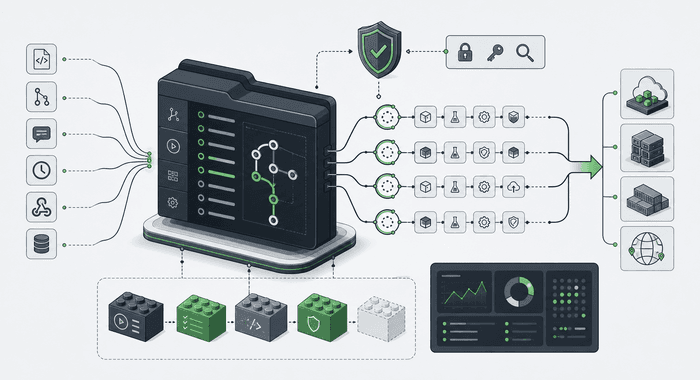
GitHub Actions is often introduced as GitHub's built-in CI/CD system, and that description is correct but incomplete.
What makes it useful is not just that it can run tests on pull requests. It is that it gives a repository-native automation model: workflows live beside the code, trigger on repository events, and can be used for far more than build pipelines. That includes release automation, security checks, documentation generation, artifact publishing, scheduled maintenance tasks, and a surprising amount of engineering governance.
Once I looked past the usual "run lint and tests on every push" framing, the system became much easier to reason about. GitHub Actions is less interesting as a YAML file runner and more interesting as an event-driven automation platform attached directly to how a team works in Git.
The mental model that matters
The core model is simple:
- A workflow is the automated process.
- An event is the trigger, such as
push,pull_request,release,schedule, orworkflow_dispatch. - A job is an execution unit inside the workflow.
- A step is one command or one reusable action inside a job.
- An action is packaged automation that can be reused.
- A runner is the machine where the job executes.
That model sounds basic, but it explains why GitHub Actions is so flexible. The platform is not tied to one kind of pipeline. It reacts to repository events and lets you chain together jobs, scripts, and reusable actions around them.
That is why the same system can support very different tasks:
- run tests and linters on pull requests
- build and publish Docker images on release
- label or triage issues automatically
- generate and upload artifacts
- schedule maintenance jobs
- run internal operational scripts behind manual approval flows
The official documentation presents Actions as a CI/CD platform, but it also explicitly frames it as a general automation layer for repository events. That broader framing is the one that makes the platform click.
A workflow is simple until the details matter
At first glance, most workflows look trivial: define the trigger, define the runner, define the steps.
In practice, the details that matter most are usually these:
on: what actually starts the workflowjobs: how work is dividedneeds: which jobs must wait for otherspermissions: what the workflow token is allowed to doenv: shared configurationconcurrency: how duplicate or overlapping runs are controlledworkflow_dispatch: how humans can trigger a run manuallyschedule: how recurring automation is modeledworkflow_call: how workflow logic becomes reusable across repositories
This is the point where Actions stops being "just CI" and starts becoming infrastructure design in miniature.
The YAML is easy to write. The hard part is deciding what should be automatic, what should be manual, what needs approval, what should run in parallel, and what permissions each workflow actually needs.
The platform is strongest when automation belongs to the repository lifecycle
The best GitHub Actions use cases are closely tied to software delivery:
- validation before merge
- packaging and release automation
- deploy orchestration
- dependency and security checks
- documentation or changelog generation
- pull request policy enforcement
That boundary is important because Actions is not automatically the right place for every background process.
For recurring business jobs, domain schedulers, queue consumers, and production workflows that belong to the application runtime, it is often better to use infrastructure that belongs to the application itself: workers, queues, Kubernetes CronJobs, or cloud-native schedulers.
That distinction keeps the system clean.
GitHub Actions is excellent for automation controlled by the repository and the delivery process. It is usually a worse fit for long-lived business execution that should exist independently from a Git event.
Performance is not just about faster runners
Once teams rely on Actions heavily, performance and cost start to matter almost immediately.
Three concepts become especially important:
Matrix builds
Matrix strategy lets one job run across multiple combinations such as operating systems, runtimes, or framework versions. That is the cleanest way to validate compatibility without duplicating YAML by hand.
Caching
Caching reduces repeated work by reusing dependencies or build inputs across workflow runs. This is usually one of the fastest ways to cut CI time and cost when install steps dominate execution.
Artifacts
Artifacts solve a different problem from cache. They are for preserving outputs from a run, such as binaries, reports, logs, or generated packages that need to be downloaded or passed across stages.
That cache versus artifact distinction matters more than it first appears. Cache helps avoid recomputing inputs. Artifacts preserve outputs. Mixing those responsibilities usually makes workflows slower and harder to debug.
Security is where workflows stop being harmless YAML
GitHub Actions can touch source code, secrets, packages, cloud environments, and deployment targets. That means workflow design is a security concern, not just a convenience concern.
The baseline security rules are straightforward:
- keep permissions as narrow as possible
- avoid giving
GITHUB_TOKENmore access than the workflow needs - treat secrets carefully and avoid exposing them through logs or plaintext
- review third-party actions before adopting them
One of the most important shifts in modern workflow design is using OpenID Connect for cloud authentication. With OIDC, a workflow can obtain short-lived credentials for providers such as AWS without storing long-lived cloud credentials as GitHub secrets.
That changes the security posture significantly. Instead of copying a permanent credential into repository settings and hoping it stays contained, the workflow can request temporary identity at runtime under tighter policy control.
If a team is serious about production deployments from GitHub Actions, this is one of the first areas worth hardening.
What changes when a company scales GitHub Actions
Small teams often start with one repository and one workflow file. That is fine for the first phase.
But larger organizations rarely stay there.
At scale, GitHub Actions becomes less about individual YAML files and more about platform consistency:
- reusable workflows instead of duplicated pipeline logic
- internal actions or composite actions for shared engineering standards
- workflow templates for common project types
- organization-level security rules and permission baselines
- controlled deployment patterns and approval paths
That is the difference between "we use Actions" and "Actions is part of our engineering platform."
The examples from GitHub's own material make that transition concrete. The GitHub engineering blog describes internal use of Actions for large-scale regression testing and release-related automation. Customer stories point to similar patterns from a different angle: Blue Yonder used Actions to move away from Jenkins bottlenecks, AstraZeneca built reusable automation patterns for security scanning and testing, Elanco leaned on composite actions and guardrails, and Grupo Boticario used GitHub-centered automation to reduce context switching across tooling.
The individual details differ, but the pattern is consistent: mature usage is less about writing more YAML and more about standardizing how automation is reused.
The practical takeaway
The most useful way to think about GitHub Actions is this:
It is a repository-native automation platform that happens to be very good at CI/CD.
That framing helps explain both its strengths and its limits.
It is strong when the trigger belongs to the repository lifecycle, when the workflow can be described as versioned automation, and when the result benefits from being visible inside pull requests, releases, issues, or deployment flows.
It is weaker when teams try to force it into roles that belong to application infrastructure or long-running business execution.
The more I looked at the documentation and real company examples, the more this became the important distinction. The question is not "Can GitHub Actions do this?" It often can. The better question is "Should this automation live next to the repository, or should it live inside the system being delivered?"
That is usually the line between a workflow that stays clean and one that slowly turns into accidental platform debt.
References
- Understanding GitHub Actions
- Workflow syntax for GitHub Actions
- Running variations of jobs in a workflow
- Dependency caching
- Secure use reference
- OIDC for AWS deployments
- Organization-wide governance and reuse for GitHub Actions
- Blue Yonder customer story
- AstraZeneca customer story
- Elanco customer story
- Grupo Boticario customer story